The Uniswap API - Built for Agents, Useful for Everyone
By Twade
Uniswap shipped a Trading API that handles routing, quoting, and Permit2 across V2, V3, V4 and UniswapX. It's also the cleanest example of AI-first developer relations in DeFi right now. A tour of what it does, how a swap flow looks in real code, and why every doc page now has an 'Open in LLM' button.
If you've spent any time building on Uniswap before this year, you'll know the routine. Pick a protocol version. Wire up the SDK. Manage your own pool lookups. Handle Permit2 yourself. Reason about routing. Stitch in UniswapX if you want gasless. Multiply the work by every chain you ship on.
The Uniswap Trading API throws most of that away. You give it the tokens, the amount, and the chain. It gives you back a route across V2, V3, V4 and (where it makes sense) UniswapX - pre-built, pre-signed, ready to broadcast. No on-chain lookups, no SDK setup, no per-protocol special cases. It's been the same infrastructure powering Uniswap's own apps for a while; the developer platform that went live in April just made it ours too.
This is a tour. What the API does, what a swap flow looks like in production code, why the CORS situation is going to surprise you the first time, and - the part I want to spend time on - how Uniswap has approached this whole thing as AI-first developer relations in a way nobody else in DeFi has quite matched yet.
For context: I was fortunate enough to workshop with Uniswap Labs during the development of these new developer resources, and they're taking it seriously - both the API surface itself and the developer-experience layer wrapped around it.
If you want to skip ahead and start swapping, the example repo at the end of this article has a working Vite + React + wagmi widget on Unichain Sepolia plus a Postman collection - get an API key and you're swapping in about ten minutes.
What the API gives you
A useful frame: think of the Uniswap API as the routing layer Uniswap's own apps already use, exposed as HTTP. The headline numbers from Uniswap Labs are ~200ms routing speeds, >97% fill rates, 10M+ assets indexed, and coverage across 18 chains - the same routing engine running behind MetaMask, OKX, Fireblocks, Anchorage, Privy, Zerion, and now whatever you ship next.
What you don't have to do yourself:
- Pool lookups. You name tokens, the API finds pools. No more piecing together token pairs + fee tiers + tick spacings + hook addresses to identify a V4 pool.
- Multi-protocol routing. A single quote will split and hop across V2, V3, V4, and UniswapX as needed. You don't write the splitter; you receive the route.
- Permit2 plumbing. The API checks allowances and gives you the permit payload to sign. You sign and broadcast; you don't reason about the allowance contract.
- Transaction encoding. The
/swapresponse includes a fully-formed transaction - calldata, value, gas estimate, the lot. Your job is to sign it. - UniswapX as a free upgrade. If your swap qualifies (Mainnet ≥ ~$300, L2 ≥ ~$1k), the API may route it through UniswapX for a gasless, MEV-protected fill - no extra integration code on your end.
There is also an LP-management arm of the same API (positions, fee claims, pool-by-ID lookups), but this piece is about the trading side. The LP endpoints deserve their own article and we'll come back to them.
Insight #1
The Trading API isn't a thin wrapper around the SDK - it's the routing and transaction-construction infrastructure Uniswap built for itself, with an HTTP front end attached. You're using the same plumbing as MetaMask. That's a meaningfully different starting point from "here are some helper functions."
The three-call flow
A "classic" swap (anything not handed off to UniswapX) is three API calls. There's one branch - UniswapX uses /order instead of /swap because the fill happens off-chain - but the rest of the flow is identical.
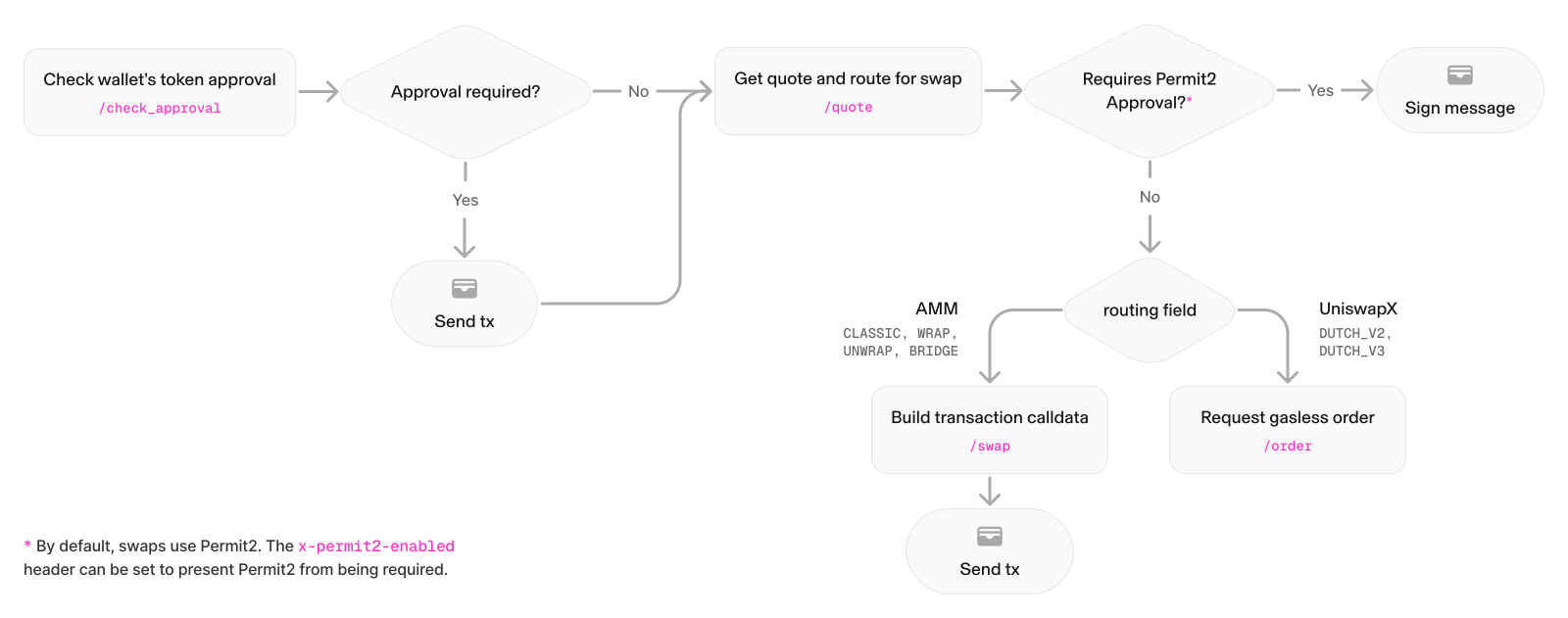
The shape of the calls:
POST /check_approval- does Permit2 already have allowance for the input token? If not, the API returns a fully-formed approval transaction for the user to sign.POST /quote- for the swap you want, return the best route and apermitDatapayload ready for the user to sign.POST /swap(classic) orPOST /order(UniswapX) - given the quote + signed permit, return the final transaction (or in UniswapX's case, submit the order for an RFQ market-maker to fill).
Three headers to know about, since the docs lean on you to set them and the error messages aren't always clear when you don't:
x-api-key: <your-key>- required, generated from the developer dashboard.x-universal-router-version: 2.0- required for the modern routing engine.Content-Type: application/json- obvious in retrospect; non-obvious until you're staring at a415 Unsupported Media Typein a browser dev console.
AI-first API development
The technical surface above is the part you can describe in a changelog. The interesting bit is how Uniswap built the developer platform around this API.
Web3 development has gone hard in the AI direction over the last year - most teams now ship alongside a coding agent, and "docs that an LLM can actually read" has shifted from nice-to-have to load-bearing infrastructure. The Uniswap platform is a very welcome example of that shift being taken seriously.
The numbers Uniswap published with the launch: ~500,000 builders visited the docs in 2025; 85% of developers they surveyed had experience building with agents. The platform they shipped reads as if they took that survey seriously and rebuilt accordingly. A few of the moves that stand out:
Gain context with llms.txt
Uniswap maintains a clean, structured Markdown index of the entire docs site at developers.uniswap.org/llms.txt. Open it in a browser and you'll see exactly what you'd want an LLM to see: concept summaries, route lists, key reference tables. It's the kind of file that turns "drop the docs into context" from a guessing game into a one-liner.
Skills via npx
There's a Uniswap-maintained agent skill you can drop into any compatible coding agent with a single command:
npx skills add uniswap/uniswap-ai --skill swap-integrationThat command installs a skill that teaches an LLM agent the swap-integration patterns - endpoint shapes, header requirements, the proxy gotcha, all of it. If you've been using Claude Code or similar tools, you're already a npx skills add away from "implement the Uniswap swap flow against my Next.js app" being a single prompt.
"Open in [LLM of your choice]" on every doc page
Alongside the table of contents, every page in the new developer platform has an Open in... button. Click it, pick your LLM, and the page lands in that LLM's context, ready to be asked questions of. A "Copy Markdown" button sits next to it for when you want to paste manually. Small interactions, but they signal a different posture: docs aren't just for human eyes anymore, and the platform isn't pretending otherwise.
The API itself is shaped for code generation. JSON in, JSON out. Verbs as endpoints. Errors are descriptive. Headers are consistent. None of this is accidental - APIs that LLMs can wire up correctly on the first try tend to share these properties. The Trading API was a good API to begin with; the developer platform just made it cleanly machine-readable as well.
Insight #2
The shift here is cultural, not just technical. Uniswap is treating LLM agents as a first-class consumer of their documentation and APIs - not as a future audience to support eventually, but as the audience that 85% of their developers are already building with. Whether or not you personally develop with an agent, this is the shape developer relations is going to take across the rest of DeFi over the next year, and Uniswap got there first.
The honest framing is this: developer relations used to be "great docs and a couple of SDKs." It's becoming "great docs, machine-readable indices, installable agent skills, copy-as-markdown on every page, and an API shaped so that agents can wire it up correctly without supervision." The Uniswap platform is the cleanest example of that transition we've seen in the space.
The CORS gotcha (and the fix)
The Trading API does not allow browser-origin requests directly. If you fetch('https://trade-api.gateway.uniswap.org/v1/...') from a frontend, the preflight gets rejected with a 415 Unsupported Media Type and your request never reaches the actual endpoint. This isn't documented prominently and the error makes it look like a content-type bug rather than a CORS one.
The fix is a same-origin proxy. In development, a Vite proxy is the cleanest path:
// vite.config.ts
export default defineConfig({
  // ...
  server: {
    proxy: {
      '/api/uniswap': {
        target: 'https://trade-api.gateway.uniswap.org/v1',
        changeOrigin: true,
        rewrite: (p) => p.replace(/^\/api\/uniswap/, ''),
      },
    },
  },
})
Then your client hits /api/uniswap/quote instead of the upstream URL. In production, you swap the dev proxy for a server-side rewrite - examples for Vercel and Cloudflare Pages are in the example repo. There's a security wrinkle here too: passing the API key from the browser through any proxy means anyone can scrape it. For production, you want a small server route that injects x-api-key server-side rather than letting the client carry it.
Insight #3
Browser → Trading API direct calls don't work. You need a proxy in dev and a server rewrite in production - and you should inject your API key server-side rather than ship it to the client. This is the single most common stumbling block when you start integrating, and the docs are quiet about it.
A real swap, end to end
This is a classic swap wired up for real. We'll use the same shape the example repo does - TypeScript, fetch, with wagmi/viem for the wallet side. The code below assumes the proxy is in place, so requests go to /api/uniswap/... rather than the gateway directly.
Step 1 - Check approval
Skip if your input token is native ETH. For ERC-20 inputs, ask the API whether Permit2 has spending allowance:
// lib/tradingApi.ts
type CheckApprovalRequest = {
  walletAddress: `0x${string}`
  token: `0x${string}`
  amount: string        // raw units, as a string - never a number
  chainId: number
}

type CheckApprovalResponse = {
  requestId: string
  // If non-null, the user needs to send this transaction first.
  approval: {
    to: `0x${string}`
    from: `0x${string}`
    data: `0x${string}`
    value: `0x${string}`
    chainId: number
  } | null
}

export async function checkApproval(
  req: CheckApprovalRequest,
): Promise<CheckApprovalResponse> {
  const res = await fetch('/api/uniswap/check_approval', {
    method: 'POST',
    headers: {
      'Content-Type': 'application/json',
      'x-universal-router-version': '2.0',
      // x-api-key is injected by the server-side proxy
    },
    body: JSON.stringify(req),
  })
  if (!res.ok) throw new Error(`check_approval failed: ${res.status}`)
  return res.json()
}
If approval is non-null, broadcast it with wagmi's sendTransaction and wait for the receipt before moving on.
Step 2 - Quote
Ask for the best route. The response is large because it carries the route metadata, the pool details for any UI you want to render, and (crucially) a permitData blob that the user has to sign:
type QuoteRequest = {
  tokenIn: `0x${string}`
  tokenInChainId: number
  tokenOut: `0x${string}`
  tokenOutChainId: number
  amount: string          // raw units of the *specified* token
  type: 'EXACT_INPUT' | 'EXACT_OUTPUT'
  swapper: `0x${string}`
  slippageTolerance: number   // e.g. 0.5 for 0.5%
  protocols?: ('V2' | 'V3' | 'V4' | 'UNISWAPX_V2')[]
}

export async function getQuote(req: QuoteRequest) {
  const res = await fetch('/api/uniswap/quote', {
    method: 'POST',
    headers: {
      'Content-Type': 'application/json',
      'x-universal-router-version': '2.0',
    },
    body: JSON.stringify(req),
  })
  if (!res.ok) throw new Error(`quote failed: ${res.status}`)
  return res.json()   // big - preserve it whole for step 3
}
Two things to know here. First, amount is always a string in raw units of the specified token (wei for ETH, base units for USDC, etc.) - JavaScript numbers will silently lose precision for large amounts, so build it with parseUnits from viem and keep it a string. Second, preserve the entire quote response and pass it back into the swap call; do not try to reconstruct it. The route metadata is opaque on purpose.
Step 3 - Swap
Sign the permitData if the route includes one, then ask the API for the final transaction:
import { signTypedData } from 'wagmi/actions'

export async function buildSwapTx(quoteResponse: any, walletClient: any) {
  // If the quote returned permitData, get the user's signature on it.
  let signature: string | undefined
  if (quoteResponse.permitData) {
    signature = await signTypedData(walletClient, {
      domain: quoteResponse.permitData.domain,
      types: quoteResponse.permitData.types,
      primaryType: quoteResponse.permitData.primaryType,
      message: quoteResponse.permitData.values,
    })
  }

  // IMPORTANT: spread the quote response directly into the body.
  // Do NOT wrap it as { quote: quoteResponse }.
  const body: any = { ...quoteResponse }
  if (signature) body.signature = signature
  // Strip null permitData explicitly - the API rejects nulls.
  if (body.permitData === null) delete body.permitData

  const res = await fetch('/api/uniswap/swap', {
    method: 'POST',
    headers: {
      'Content-Type': 'application/json',
      'x-universal-router-version': '2.0',
    },
    body: JSON.stringify(body),
  })
  if (!res.ok) throw new Error(`swap failed: ${res.status}`)
  const { swap } = await res.json()

  if (!swap?.data || swap.data === '0x') {
    throw new Error('swap returned empty calldata - refusing to broadcast')
  }
  return swap   // { to, data, value, gasLimit, chainId, ... }
}
Then you broadcast swap like any other transaction:
const hash = await walletClient.sendTransaction({
  to: swap.to,
  data: swap.data,
  value: BigInt(swap.value ?? '0x0'),
  gas: swap.gasLimit ? BigInt(swap.gasLimit) : undefined,
})
Three calls, one signature, one broadcast. The Universal Router does the rest on-chain - splits across protocols, settles Permit2, returns the output token.
A few worth-knowing details once you're past hello-world:
- The route can change between quote and swap. Quotes are short-lived; if the user takes a long time to sign, you may need to refetch. A debounce-on-input pattern (as in the example repo's
useQuote.ts) keeps things fresh without thrashing the API. - Slippage handling lives in the quote. Your
slippageTolerancebecomes theamountOutMinimumbaked into the swap's calldata. You don't enforce it again on-chain. - The same flow works for UniswapX, except your final call is
POST /orderand the API holds the order until a market-maker fills it. No transaction for you to broadcast.
Try it for real
I built a small playground for getting hands-on with the Trading API on Unichain Sepolia - a single-page swap widget you can run locally, plus a Postman collection that mirrors the same API calls if you'd rather poke at it endpoint-by-endpoint.
What's in it:
- A working swap widget built with Vite, React, TypeScript, wagmi v2, viem, and RainbowKit. Connect a wallet, pick tokens, get a live quote, run the approve → sign → swap flow, see the transaction land in a persistent history.
- The Vite proxy config we covered above, ready to use.
- A
useSwapFlow.tshook that implements the three-call pattern as a state machine - a good reference for adapting it into your own stack. - A
uniswap-trading-api.postman_collection.jsonfile you can import and run the API calls directly with your own key, no frontend required. Useful for testing edge cases or building integrations that aren't browser-based.
To get going: clone the repo, generate an API key from the Uniswap developer dashboard, drop it into .env, and npm run dev. About ten minutes from clone to your first quote on Unichain Sepolia.
Recap
- The Trading API is the same routing infrastructure Uniswap's own apps run on, exposed over HTTP. Three calls -
check_approval,quote,swap- and the API does pool lookups, multi-protocol routing, Permit2 plumbing, and transaction encoding for you. - The browser can't call it directly. You need a proxy in dev and a server-side rewrite in production, and the API key should never ship to the client.
- The flow is preserve-quote-and-spread-it. Pass the full quote response into the swap body verbatim, attach the user's permit signature if there is one, strip nulls, validate non-empty calldata before broadcasting.
- The developer platform is AI-first in a way nobody else in DeFi is yet -
llms.txt, installable agent skills, "open in LLM" on every doc page, an API shape that's friendly to code generation. Worth paying attention to even if you're not personally building with agents.
What to read next
- The Uniswap developer docs themselves - developers.uniswap.org/docs. The new docs site is well-built; don't sleep on it.
llms.txt- developers.uniswap.org/docs/uniswap-ai/llms.txt. The agent-readable index. Worth a read even as a human - it's a great summary of the whole platform.- The Uniswap AI skill -
npx skills add uniswap/uniswap-ai --skill swap-integration. Drop it into your coding agent and "build me a Uniswap swap integration" becomes a one-prompt task.
If you ship something with the API and hit a rough edge, reach out on X and let me know.