SwapBoy - I Asked Claude for a Game Boy That Swaps Tokens. It Said Yes.
By Twade
One prompt to Fable 5.0 with Claude. One follow-up for mobile. The result is swapboy.xyz - a Pokémon Blue-flavoured frontend for the Uniswap API with working MIDI audio, pixel art, character dialogue, top-5 pool integration, and a real on-chain swap path. A short post on what this says about the state of agentic development against the Uniswap API.
I just bought 662,122 $TAKEOVER tokens from a Pokémon Center.
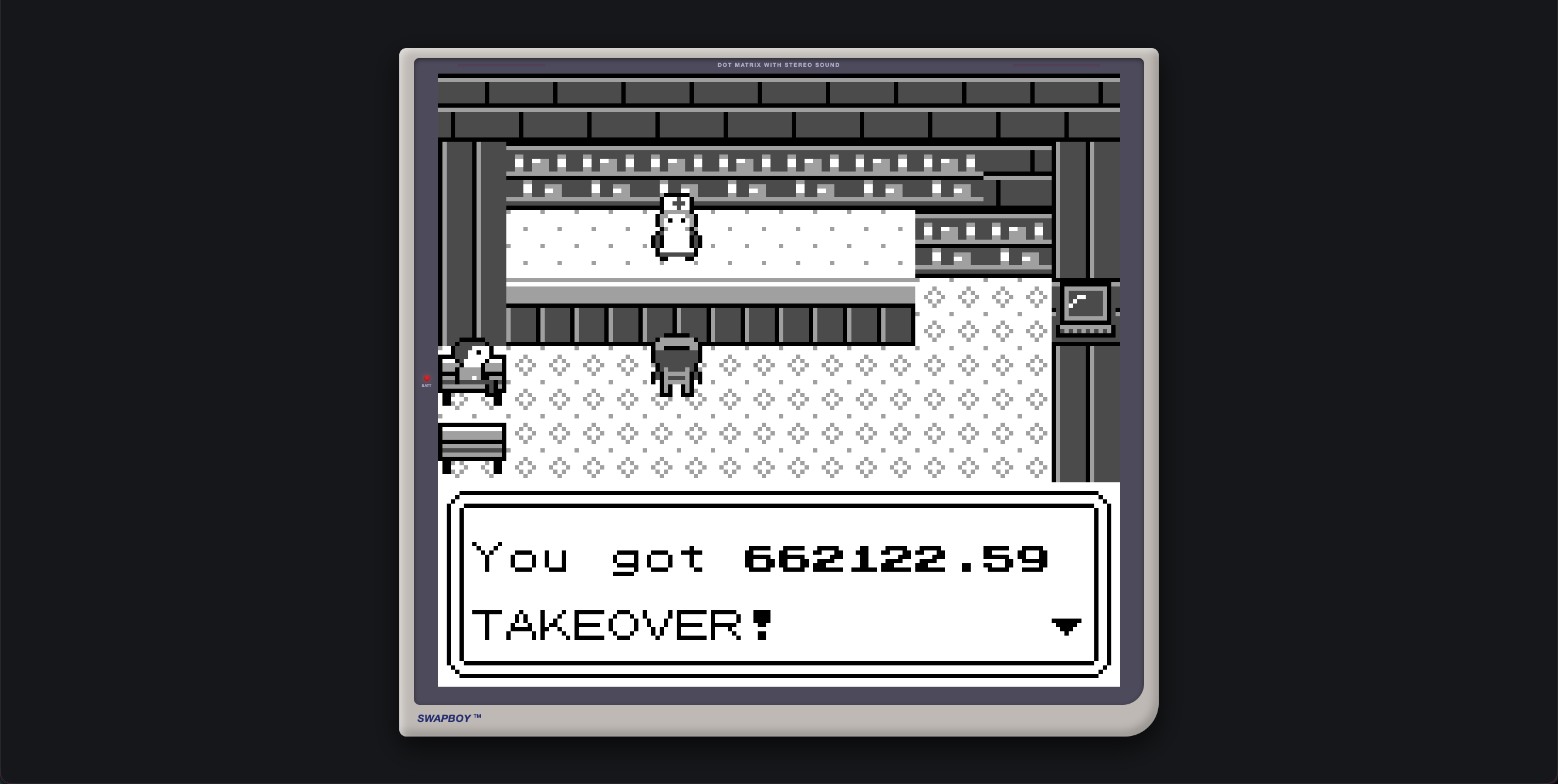
The site is swapboy.xyz. It boots with a "Uniswap Edition" title screen featuring a Ponyta-turned-Unicorn standing in for Squirtle. Press space to connect your wallet, drop into a pixel-perfect Pokémon Center, walk to the counter with WASD, talk to Nurse Joy, pick "Swap Tokens," and you land in a Game Boy-flavoured swap UI that pulls live data from the top five Uniswap pools and executes the swap end-to-end. It plays MIDI audio cues that are correct to the era. There's an old man on a chair with a real grievance about graded slabs from Collector Crypt. There's a PC that says "Update install.. check back later" because of course there is.
I built it with one prompt to Fable 5.0 with Claude. There was a single follow-up to add mobile support. That's the entire dev cycle.
This post is short. It exists to share what the prompt was, what came back, and what I think it says about the state of building against the Uniswap API right now.
The prompt
Verbatim. Nothing snipped:
I want to create an ambitious frontend for the Uniswap API. I want to
replicate the feel and vibe of an old Pokemon Blue, black and white
experience. The load up screen should show a Ponyta and has been turned
into a Unicorn, replacing the squirtle in this image:
'/Users/twade/Downloads/maxresdefault-1.jpg'. It should be labelled as
"Uniswap Edition". When the user presses space they will be prompted to
connect their EVM wallet. When they do, they load into a Pokemon Center
('/Users/twade/Downloads/hqdefault-1.jpg') and be able to move using WASD
and action using space bar. The man on the chair should have speech based
on a JSON input. Just have "I wanted to trade my graded Pokemon Slabs
from Collector Crypt, but they only do ERC-20 here." content for now. The
woman behind the desk should say "Welcome to the Pokemon Center! How can
I help?" with the options of "Swap Tokens" or "Nothing..". The computer
will just saying "Update install.. check back later". There needs to be
audio queues and feedback in a midi format, accurate to the game. If the
user chooses to swap tokens, then the API should pull in the top 5
trading pools and provide a game boy UX swap interface
That's the whole input: one blob of intent, two reference images, a handful of dialogue strings, and a spec for the swap surface ("top 5 trading pools, Game Boy UX") that I deliberately left under-defined because I wanted to see what it would do.
What came back was a working app. Not a prototype, not a Storybook page - a deployable frontend with a real wallet connection, real on-chain Uniswap routing, a complete pixel-art scene, an NPC dialogue system, and MIDI audio cues correct to the original Game Boy era. The MIDI was generated. The pixel art was interpreted from the reference images. The user journey was assembled from the prompt's narrative beats.
The single follow-up was: make it work on mobile. Everything else came back right in the first pass.
Why this lands so cleanly
I think there are three things going on, and all three reflect deliberate choices Uniswap has made over the past year.
The Uniswap API is shaped for agents. I wrote about this at length in the Trading API piece. JSON in, JSON out, simple verbs (check_approval, quote, swap), consistent headers, errors that explain themselves. An API that an agent can wire up correctly on the first attempt tends to share these properties. The Trading API was designed that way; SwapBoy is what that design choice looks like in practice.
The AI-first DevRel work is paying off. llms.txt, installable agent skills, "Open in LLM" buttons on every doc page, an SDK ecosystem (the Community Uniswap SDK ships TanStack Intent skills versioned with the package) - the whole stack is set up so an agent can find what it needs without supervision. When I asked Claude for top-5 pool integration, it didn't have to guess. The docs were structured for it.
The dev cycle has changed. A year ago, swapboy.xyz would have been a two-week side project. Maybe three. You'd write the Vite scaffold, the wallet provider plumbing, the routing-API integration, the slippage UI, find or commission the pixel art, hand-write or license the audio, build the dialogue system, do the mobile pass. The work didn't disappear - most of it still happened - but it happened in one shot on the strength of a single piece of intent. That's a different shape of building, and it's not going to un-shape.
Insight
The interesting part of SwapBoy is that the demo took one prompt. The Uniswap API + a capable coding agent + AI-first documentation produced a working frontend, including MIDI audio and pixel art interpretation, in a single shot. That's a meaningful threshold to have crossed.
Under the hood - three places the model shines
SwapBoy is a small codebase - about 2,500 lines of TypeScript - but three areas reveal what the model did with the under-specified parts of the prompt. The pixel-art system the prompt didn't describe. The MIDI it derived from primary sources. And the Trading API integration, with breadcrumbs in the source that trace straight back to the agent skill that taught it.
1. The Unicorn - ASCII pixel grids and a 4-shade palette
The whole pixel-art system is built on hand-drawn ASCII grids that get baked into canvases at boot. The Unicorn lives in src/gfx/art/title.ts as a 56×56 character grid where each character is a palette index - . for transparent, 0 through 3 for the four Game Boy shades, lightest to darkest:
// src/gfx/art/title.ts
/** Unicorn (Ponyta-like, flame mane/tail, straight horn) facing right. 56x56. */
export const TITLE_UNICORN = `
...............................................333......
...............................................303......
........................................33333.3003......
.....................................3331213330033......
....................................3311133333003.......
...................................300333..330033.......
...................................300313..30003........
..............................333330220333330033........
............................3312133022031330003.........
..........................331121133222231300033.........
// ... 40 more rows of the body, legs, fire mane and flank ...
`;
The parser is six lines of real work - split into rows, find the widest, build a row-major Int8Array of palette indices with -1 for transparency:
// src/gfx/sprites.ts
export function parseGrid(src: string): PixelGrid {
  const rows = src.split('\n').filter((r) => r.trim().length > 0);
  const h = rows.length;
  const w = Math.max(...rows.map((r) => r.length));
  const px = new Int8Array(w * h).fill(-1);
  for (let y = 0; y < h; y++) {
    const row = rows[y]!;
    for (let x = 0; x < row.length; x++) {
      const c = row[x]!;
      if (c >= '0' && c <= '3') px[y * w + x] = c.charCodeAt(0) - 48;
    }
  }
  return { w, h, px };
}
Then bakeGrid paints those indices into an offscreen canvas with the right colours from the palette. Two design choices in particular are doing a lot of work behind the authentic feel.
First, the palette is 2-bit Game Boy authentic:
// src/gfx/palette.ts
export const BW: Palette = [
  [0xff, 0xff, 0xff],   // 0 - white
  [0xaa, 0xaa, 0xaa],   // 1 - light gray
  [0x55, 0x55, 0x55],   // 2 - dark gray
  [0x00, 0x00, 0x00],   // 3 - black
];
Second, there's a proper 4-step fade-to-white function that implements the actual Game Boy scene-transition animation:
// 4-step Game Boy fade: each step shifts every shade one slot toward white.
// fadeLevel 0 = normal palette, 4 = fully white.
export function fadedPalette(base: Palette, fadeLevel: number): Palette {
  const lvl = Math.max(0, Math.min(4, fadeLevel | 0));
  return [0, 1, 2, 3].map((i) => {
    const src = i - lvl;
    return src < 0 ? WHITE : base[src as 0 | 1 | 2 | 3];
  }) as Palette;
}
And the canvas itself is the right resolution. A 160×144 backbuffer (the literal Game Boy resolution), integer-scaled onto whatever the user's viewport size happens to be, with image smoothing explicitly disabled. The dot-matrix grain isn't post-processing - it's the actual pixel density:
// src/gfx/screen.ts
export const GB_W = 160;
export const GB_H = 144;

function resize(): void {
  const cw = window.innerWidth - CHROME_X;
  const ch = window.innerHeight - CHROME_Y;
  const k = Math.max(1, Math.floor(Math.min(cw / GB_W, ch / GB_H)));
  visible.width = GB_W * k;
  visible.height = GB_H * k;
  vctx.imageSmoothingEnabled = false;
}
Worth pulling out: none of this - the ASCII grid format, the 2-bit palette, the 4-step fade, the 160×144 fixed-buffer integer-scaling architecture - was in the prompt. The prompt said "Pokémon Blue, black and white experience." The model chose this entire architecture because it's the right one for the constraint.
2. The MIDI - transcribed from the actual Pokémon disassembly
This is the part that surprised me. The model didn't generate the music. It went to pret/pokered - the open-source reverse engineering of Pokémon Red - pulled the original assembly source for both the Pokémon Center and title-screen tracks, and mechanically transcribed them into JSON by deriving the timing maths, frequency table, and octave mapping from the game's own audio engine.
It also left a notes file documenting exactly what it did. The first paragraph reads like an emulator author's blog post:
Sources (fetched 2026-06-10 from `pret/pokered` master):

- `audio/music/pokecenter.asm`
- `audio/music/titlescreen.asm`
- `macros/scripts/audio.asm` (command encodings)
- `audio/engine_1.asm` (note length / tempo / pitch math)
- `audio/notes.asm` (frequency table)
- `constants/audio_constants.asm` (`C_`=0 … `B_`=11)

The transcription was produced by mechanically executing the channel scripts
(including `sound_call` subroutines, finite `sound_loop N` repeats, and state
that persists across `sound_ret` - octave, note speed, duty), not by hand.
It gets into proper hardware-level details. The Game Boy wave channel uses a different frequency formula than the square channels, which is the kind of thing informal transcriptions get wrong and that breaks the bass line:
Wave channel (Ch3) is one octave lower. Audio1_ApplyWavePatternAndFrequency
writes the same register value to CH3 (`ld [hl], e ; store frequency low byte`),
but Game Boy hardware CH3 produces `f = 65536/(2048−X)` - half the square
channels' `131072/(2048−X)` (32-sample wave vs 8-step duty). All Ch3 notes are
therefore shifted −12 semitones in the JSON.
The notes file also includes a verification section. The model hand-checked the first and last eight notes of every channel against the original assembly, and asserted that all three channels of each track loop to exactly the same length (a meaningful end-to-end check - the channels are written independently in the asm, so equal loop lengths are strong evidence the transcription is structurally correct).
The output is JSON with notes, ticks, and lengths - the first few notes of the title-screen lead:
{
  "name": "title",
  "secondsPerTick": 0.037671089,
  "lengthTicks": 1152,
  "loop": true,
  "channels": [
    {
      "duty": 0.75,
      "gain": 0.55,
      "notes": [
        { "midi": 62, "tick": 0, "len": 18 },
        { "midi": 59, "tick": 18, "len": 6 },
        { "midi": 62, "tick": 24, "len": 24 },
        { "midi": 60, "tick": 48, "len": 18 },
        { "midi": 65, "tick": 66, "len": 18 },
        { "midi": 60, "tick": 84, "len": 12 }
      ]
    }
  ]
}
Which is then played through a real Game Boy APU rebuilt in Web Audio. The pulse channels use Fourier-series-constructed PeriodicWaves at the four authentic Game Boy duty cycles (0.125 / 0.25 / 0.5 / 0.75), and the noise channel is a proper 15-bit LFSR with a 7-bit mode:
// src/audio/apu.ts
function makeDutyWave(c: AudioContext, d: number): PeriodicWave {
  const N = 64;
  const real = new Float32Array(N + 1);
  const imag = new Float32Array(N + 1);
  for (let n = 1; n <= N; n++) {
    real[n] = (2 / (n * Math.PI)) * Math.sin(2 * Math.PI * n * d);
    imag[n] = (2 / (n * Math.PI)) * (1 - Math.cos(2 * Math.PI * n * d));
  }
  return c.createPeriodicWave(real, imag);
}

function makeLfsrBuffer(c: AudioContext, sevenBit: boolean): AudioBuffer {
  const len = sevenBit ? 127 : 32767;
  const reps = sevenBit ? 64 : 2;
  const buf = c.createBuffer(1, len * reps, c.sampleRate);
  const data = buf.getChannelData(0);
  let lfsr = 0x7fff;
  for (let i = 0; i < len * reps; i++) {
    const bit = (lfsr ^ (lfsr >> 1)) & 1;
    lfsr = (lfsr >> 1) | (bit << 14);
    if (sevenBit) lfsr = (lfsr & ~0x40) | (bit << 6);
    data[i] = lfsr & 1 ? 0.5 : -0.5;
  }
  return buf;
}
This is real synthesis. Band-limited pulse waves, the right LFSR widths, 4-bit envelopes, lookahead sequencing. The sound isn't like the Game Boy. It's how the Game Boy did it.
What the prompt said about audio was, in full: "There needs to be audio queues and feedback in a midi format, accurate to the game." The model interpreted that as "go to the primary source, transcribe the music faithfully from the assembly, derive the timing math from the audio engine, account for the wave-channel frequency-register difference, and rebuild the synth from first principles so it can play it back." Nothing in the brief asked for any of that. It just happened.
3. The Uniswap API - and the "Skill rules" comments
The Trading API integration ties most directly back to the AI-first DevRel argument from the Trading API piece. The shape of the client is exactly what that article describes - three calls, same-origin proxy because the API rejects browser-origin CORS, two required headers:
// src/uniswap/tradingApi.ts
// Uniswap Trading API client, ported from the prior working integration
// (public-events/Uniswap Trading API/swap-widget). The API sends no CORS
// headers, so requests go through a same-origin proxy at /uniswap-api
// (Vite dev proxy locally, vercel.json rewrite in production).
import { isAddress, isHex, type Address, type Hex } from 'viem';

const API_BASE = '/uniswap-api';

const BASE_HEADERS = {
  'Content-Type': 'application/json',
  'x-api-key': '...',
  'x-universal-router-version': '2.0',
} as const;
But the interesting bit is the comments. Multiple functions carry inline // Skill rules: markers - the model is citing the agent skill it was using as the source of specific behavioural rules. Verbatim from the source, on the quote endpoint:
export async function getQuote(params: {
  swapper: Address;
  tokenIn: Address;
  tokenOut: Address;
  amount: string;
}): Promise<ClassicQuoteResponse> {
  // Skill rules: chain IDs as STRINGS. routingPreference must be BEST_PRICE or
  // FASTEST (the API rejects CLASSIC); on Base, BEST_PRICE returns CLASSIC routes.
  return postJson<ClassicQuoteResponse>('/quote', {
    swapper: params.swapper,
    tokenIn: params.tokenIn,
    tokenOut: params.tokenOut,
    tokenInChainId: String(BASE_CHAIN_ID),
    tokenOutChainId: String(BASE_CHAIN_ID),
    amount: params.amount,
    type: 'EXACT_INPUT',
    slippageTolerance: 0.5,
    routingPreference: 'BEST_PRICE',
    protocols: ['V2', 'V3', 'V4'],
  });
}
And on the swap endpoint:
export async function getSwap(
  quoteResponse: ClassicQuoteResponse,
  permit2Signature?: Hex,
): Promise<SwapResponse> {
  // Skill rules: spread the quote into the body (never {quote: ...}); strip
  // permitData/permitTransaction; signature+permitData both or neither.
  const { permitData, ...cleanQuote } = quoteResponse as ClassicQuoteResponse & {
    permitTransaction?: unknown;
  };
  delete (cleanQuote as { permitTransaction?: unknown }).permitTransaction;

  const body: Record<string, unknown> = { ...cleanQuote };
  if (permit2Signature && permitData && typeof permitData === 'object') {
    body.signature = permit2Signature;
    body.permitData = permitData;
  }
  return postJson<SwapResponse>('/swap', body);
}
This is the AI-first DevRel feedback loop closing on itself, visible in production code. Uniswap publishes an agent skill that teaches the LLM how to call the API correctly. The LLM uses that skill while building SwapBoy. The skill's behavioural rules - chain IDs as strings, routingPreference must be BEST_PRICE, spread the quote into the body, strip permitData when null - show up as inline comments in the source. The skill became self-documenting at the integration point.
There's also a guard that catches the exact failure mode the skill warns about - quote expiry returns empty calldata, which would silently broadcast a zero-data transaction otherwise:
/** Empty calldata means the quote expired - re-quote and retry. */
export function validateSwapTx(tx: SwapTx): void {
  const data = tx?.data as string | undefined;
  if (!data || data === '' || data === '0x') {
    throw new TradingApiError('swap.data is empty - quote expired', 0, { expired: true });
  }
  if (!isHex(tx.data)) throw new Error('swap.data is not valid hex');
  if (!isAddress(tx.to)) throw new Error('swap.to is not a valid address');
  if (tx.value === undefined || tx.value === null) throw new Error('swap.value is missing');
}
For the pool-selection part of the prompt - "the API should pull in the top 5 trading pools" - the model reached for GeckoTerminal's keyless public API rather than rolling its own indexer. Total integration is about 60 lines, includes a 60-second cache to stay under the rate limit, and surfaces enough metadata to render the in-game swap menu:
// src/uniswap/pools.ts
const URL =
  'https://api.geckoterminal.com/api/v2/networks/base/dexes/uniswap-v3-base/pools' +
  '?sort=h24_volume_usd_desc&include=base_token,quote_token&page=1';

const CACHE_MS = 60_000;
let cache: { at: number; pools: PoolInfo[] } | null = null;

export async function fetchTopPools(count = 5): Promise<PoolInfo[]> {
  if (cache && Date.now() - cache.at < CACHE_MS) return cache.pools.slice(0, count);

  const res = await fetch(URL, { headers: { Accept: 'application/json' } });
  if (!res.ok) throw new Error(`GeckoTerminal ${res.status}`);
  const body = (await res.json()) as { data: GtPool[]; included: GtToken[] };
  // ... map base/quote tokens, parse fee tier, sort by volume ...
  return pools.slice(0, count);
}
It's the kind of "go find the right keyless API for this" integration choice that would have taken an afternoon of research and another afternoon of writing. Here it's about a third of one source file.
The mobile follow-up, while we're here: WASD on desktop, a virtual D-pad and A/B overlay on touch devices, automatically detected via matchMedia('(hover: none) and (pointer: coarse)'). The screen module shrinks the bezel automatically to make room for the controls. One follow-up prompt, the model wired the input layer twice without me having to think about it.
Use the same skill
The Uniswap AI swap-integration skill - the one those // Skill rules: comments are quoting - installs into any compatible coding agent (Claude Code, Codex, Cursor, Copilot, Amp) with one command:
npx skills add uniswap/uniswap-ai --skill swap-integrationThe full catalogue lives at developers.uniswap.org/docs/uniswap-ai/skills, alongside the agent-readable llms.txt index. The Zaha Studio Community SDK ships its own TanStack Intent skills versioned with the package (npx @tanstack/intent@latest load @zahastudio/uniswap-sdk), so the broader V4 stack is increasingly self-documenting at the agent layer. If you're building on V4 with an agent in 2026, the Uniswap swap-integration skill is the single highest-leverage thing you can install.
Try it, and the tweet
The site is live at swapboy.xyz. Connect a wallet, walk to the counter, do a small test swap. Watching SwapBoy execute a real on-chain transaction is, I won't lie, more satisfying than it has any right to be.
The announcement tweet with the boot-up clip and a quick walkthrough is here:
With Fable 5.0 release I wanted to see what it could do. So logically I combined Pokémon, @Uniswap V4 and @flaunchgg.
— twade.eth (@TomWade) June 11, 2026
With a one-shot prompt and some small tweaks afterwards, I deployed SwapBoy.https://t.co/vpx1nuTstL
If you fork the idea, build something else with the same flow, or land on an even shorter prompt that gets a working app out, I want to see it - tag me on X.
More coming
This is the first of what's going to become a regular thread on ticks.wtf - exploring AI-driven development flows against the Uniswap stack. SwapBoy was a fun one because the brief was deliberately maximalist; the next ones will mix it up. Some will be agentic bot builds (DCA bots, stablecoin rebalancers, treasury automations), some will be lean tooling experiments, some will probably be more unhinged hardware demos in the spirit of this one. The plan is to document the flow honestly - the prompt, what came back, what I had to iterate on, where the model surprised me, where it didn't - so other builders can see what's working right now.
If there's an AI flow against the Uniswap API you'd like to see me try, or you're sitting on a wild prompt you want to share, reach out on X and let me know.